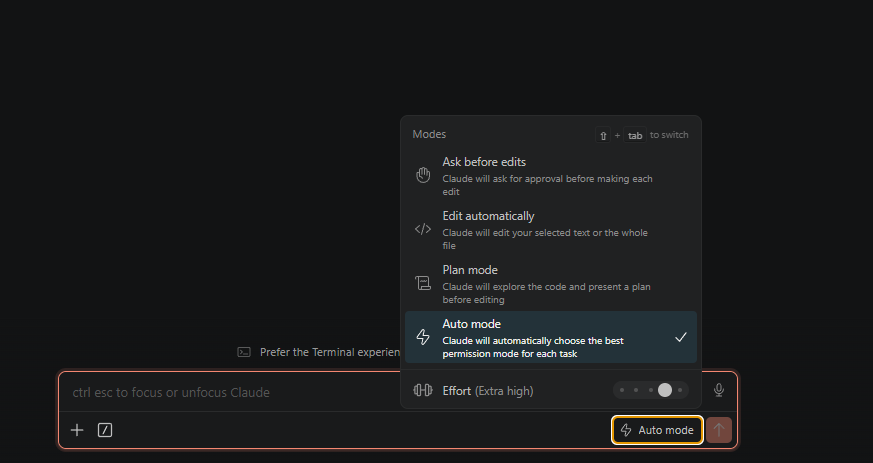
Both Claude Code and ChatGPT have rolled out auto-approval modes that let the assistant keep working without stopping for every prompt. They are useful, but they shift where the safety boundary actually lives, which is worth understanding before flipping the switch.
What “auto” actually means
The new modes do not remove permissions. They re-route them. Instead of asking before each action, the assistant proceeds on low-risk work and pauses only when something looks consequential: deleting data, touching shared systems, or sending messages to external services.
In Claude Code, auto mode is opt-in per session and still routes through the normal allow/deny rules in settings.json. In ChatGPT’s agentic flows, the equivalent is the agent’s autonomous execution mode, which keeps a similar guardrail around irreversible actions.
The point is not “approve everything.” It is “approve a class of things in advance, and stop me on the rest.”
Where this is genuinely useful
- Long mechanical tasks — refactors, migrations, batch edits, dependency bumps. The work is repetitive, the steps are individually low risk, and constant approval prompts add nothing.
- Exploratory research — reading files, running searches, fetching docs. Read-only work is the easiest case for auto mode.
- Local, reversible work — anything fully contained in a git working tree. If you can
git reset, the cost of a mistake is small.
Where to keep your hand on the wheel
- Anything that writes to shared systems: databases, CI/CD, deploy targets, message platforms.
- Anything that costs money or sends communication you cannot recall.
- Anything you would not want to debug from a diff alone. Auto mode produces real output, and reviewing it after the fact is still your job.
The mode is not a substitute for review. It just changes when the review happens.
Configure it once, trust it consistently
The pattern that works best is to spend a few minutes tuning the allow/deny list up front. Allow the boring read-only commands you run all day. Keep deletions, force-pushes, and outbound messages on the manual list. That way auto mode removes the noise without removing the things that actually need a human.
In Claude Code, that lives in ~/.claude/settings.json (or the project-scoped .claude/settings.json) and looks something like this:
{
  "permissions": {
    "allow": [
      "Bash(git status)",
      "Bash(git diff:*)",
      "Bash(git log:*)",
      "Bash(npm test)",
      "Bash(npm run build)",
      "Read(**)",
      "Grep(**)"
    ],
    "deny": [
      "Bash(rm -rf:*)",
      "Bash(git push --force:*)",
      "Bash(git reset --hard:*)",
      "Bash(gh pr merge:*)"
    ]
  }
}
The allow list is the boring stuff you would approve every time anyway. The deny list is the small set of things you never want the assistant doing on its own, regardless of mode. Everything else still prompts.
If you find yourself reflexively approving every prompt anyway, that is a signal that your allowlist needs work, not that you should bypass permissions entirely. Which, as covered in the previous post, is a different problem with a much worse failure mode.
The short version
Auto mode is a productivity feature with a safety contract. It works when you treat it as “pre-approved scope” rather than “full trust,” and when the boundary between the two is something you actually thought about, not something you accepted by default.